105 posts tagged with "TouchDesigner"

Posts about working with TouchDesigner and using it in production environments

View All Tags

TouchDesigner | The Container, Control, and Final Output

· 5 min read

Matthew Ragan
Pixel Pusher

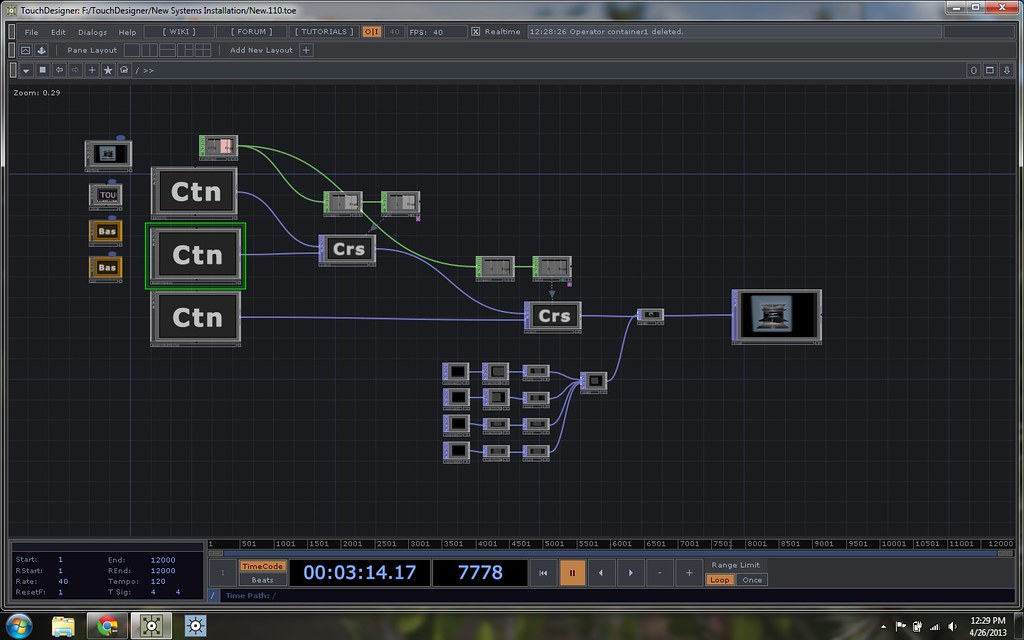
In thinking about how to meet the objectives that I had for this piece, one of my central questions was how to make sure that I could move through three cued scenes – either with manual or automatic triggers. I knew that I had three different aesthetic environments that I wanted to move through. I explored several different options, and the one that ultimately made sense to me given my current level of proficiency (at this point I had only been programming in Touch for a total of three weeks) in TouchDesigner was to use a cross fading approach. Here's what the whole network looks like:
Production image

TouchDesigner | The Individual Composited Scene

· 8 min read
Matthew Ragan
Pixel Pusher

There are always large questions to answer when thinking about creating an interactive work: Who is it for? What does it look likes? What are you trying to communicate? How much instruction do you provide, how little instruction do you provide? And on and on. As I started to think about how this piece was going to work as an installation rather than as a performance apparatus, I started by thinking about what kind of data I could use to drive the visual elements of this work. One of the sensors that I knew I could easily incorporate into my current sculptural configuration was a an iPod Touch. The Touch has an on-board gyroscope and accelerometer. After a conversation with my adviser (Jake Pinholster) we decided that this would be a direction of exploration worth pulling apart, and from there I went back to TouchDesigner to start thinking about how I wanted to incorporate live data into the piece I was making.

Production image

TouchDesigner | The Underlying Geometry

· 6 min read
Matthew Ragan
Pixel Pusher
info

Author's note - while I appreciate the work of my past self, this post is truly a message from a different time in my experience in TouchDesigner. I've only left this online as a way to peer into the past, but not as actual recommendations for current work.

One of the benefits of working with TouchDesigner is the ability to work in 3D. 3D objects are in the family of operators called SOPs – Surface Operators. One of the aesthetic directions that I wanted to explore was the feeling of looking into a long box. The world inside of this box would be characterized by examining artifacts as either particles or waves with a vaguely dual-slit kind of suggestion. With that as a starting point I headed into making the container for these worlds of particles and waves.

Production image

TouchDesigner | Time Trigger

· 2 min read
Matthew Ragan
Pixel Pusher
info

Author's note - while I appreciate the work of my past self, this post is truly a message from a different time in my experience in TouchDesigner. I've only left this online as a way to peer into the past, but not as actual recommendations for current work.

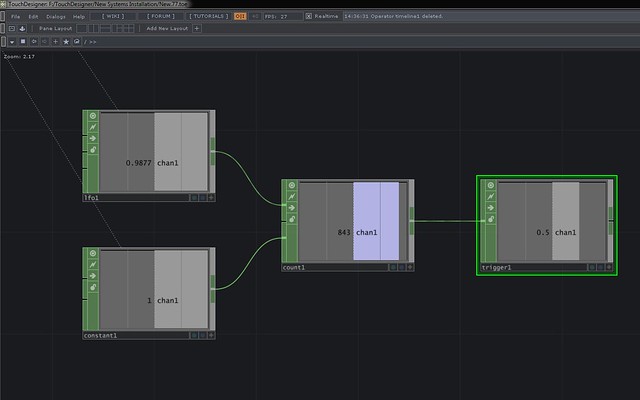
Ultimately I don't know how practical this method is, but at the moment it feels like a victory. Creating a time based trigger in TouchDesigner can be accomplished a ton of ways, the method I'm using uses the following CHOPS: LFO, Constant, Count, Trigger.

The set to the same sample rate as the project will cross 0 once per second. The constant indicates the rate at which you wish to count. Count will use the input from the LFO and the Constant to count at the rate specified by the constant every time the LFO crosses 0. This is attached to a trigger CHOP. The trigger's threshold can e set to to the time (in seconds) appropriate for the transition. Bang. A time based triggering method using four CHOPs.

Production image